A lead and its workers
Turn on Swarm and tick the machines to use. The lead splits the job, each worker builds its piece on a branch of its own, and what passes your check lands back as one change.
Magnum runs Claude Code, Codex, Pi and the other agents you already use as one team, across your Mac, your servers and cloud sandboxes. A lead splits the task, workers build it, and what passes your check lands as one change.
Free, on the plans you already pay for. Backed by Anthropic’s Claude Startups program
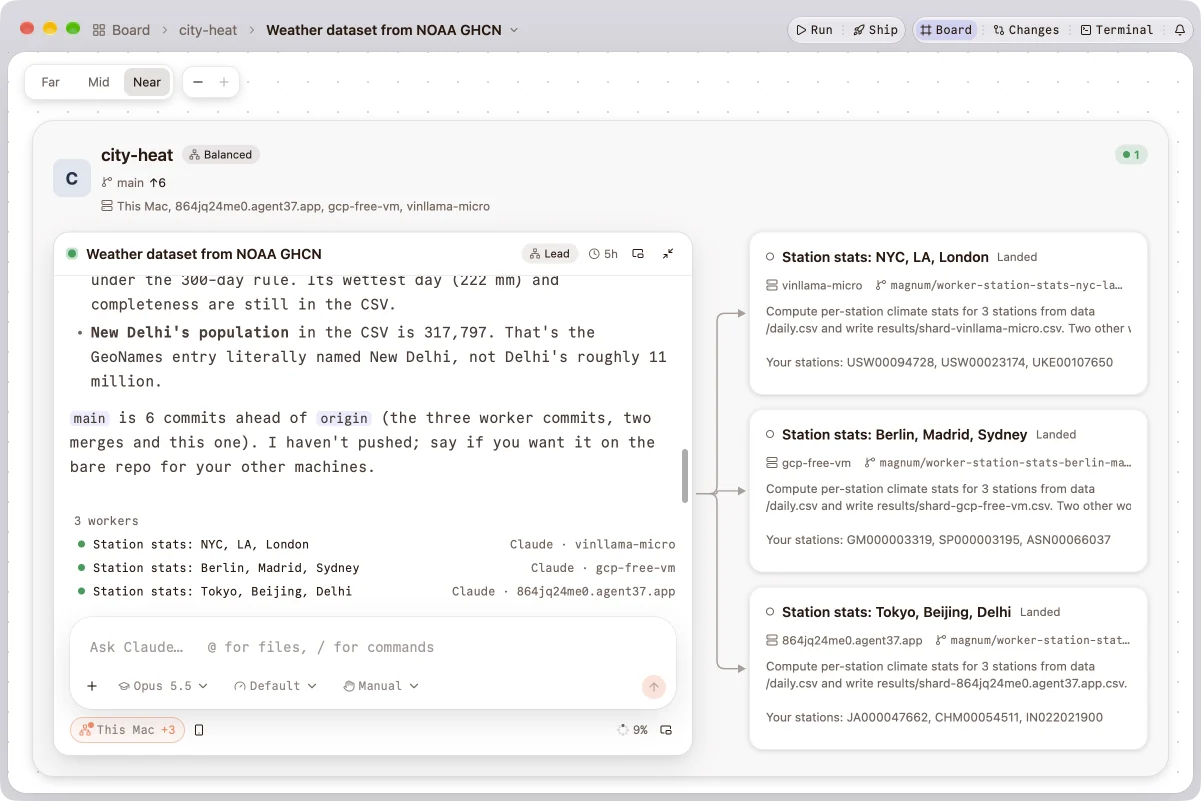
A real run, filmed in Magnum. A lead on a Mac split a climate-stats job over nine cities’ weather records into three workers, one per machine. Each landed its commit, and the lead joined the results.
Tell a session what you want. Magnum runs the agents, the machines and the git around them, and comes back with a change you can review.
Turn on Swarm and tick the machines to use. The lead splits the job, each worker builds its piece on a branch of its own, and what passes your check lands back as one change.
Six agents, each on its own sign-in, so your Claude or ChatGPT plan works as it does in your terminal. Set the model to Auto and Magnum Router picks one for each message, and tells you why.
Agents run on the machines, not in the app’s window. Quit Magnum or lose the Wi‑Fi and they keep working. Nothing ends an agent for being quiet.
Add a machine and Magnum puts one small binary in your home folder there: no sudo, no open ports, your ~/.ssh/config as it is. Its projects and sessions then sit beside your Mac’s.
A worker’s commands, questions and plans go to its lead first. What reaches you comes with the diff, so a yes takes a glance, and one answer closes the ask everywhere.
Magnum for iPhone shows what needs you, what’s running and what’s done. Allow a command or answer a question straight from the notification, behind Face ID. It’s on TestFlight.
An automation is a list of steps Magnum goes through for you, when you say so or on a schedule, with Magnum open or closed. A session is one kind of step.
Run shows what you’re building: a web app in a browser tab, a phone app in a simulator. Ship commits, tests and pushes, asks before the push, and follows what happens after.
Every session on every machine says whether it’s working, waiting for you or done. The Factory joins each lead to its workers and draws a run step by step, from prepare to land.
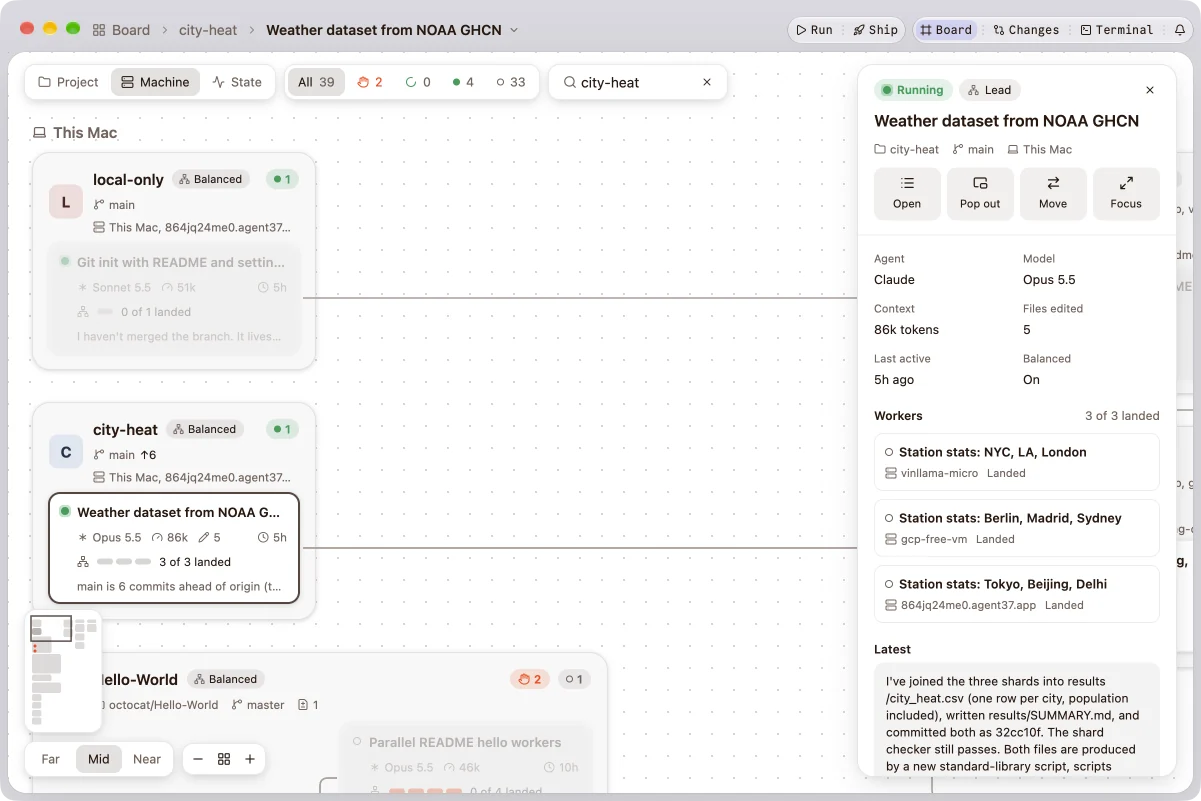
One session that leads your leads: it starts them across your projects, answers what they ask when it can, and tells you what’s worth your attention.
Control lists every run on every machine. Usage shows what your agents spent, by day, model and project.
Rewind a session to any earlier prompt: the conversation, the files the agent changed, or both.
Agents on more than one machine need a lot around them. It’s all in the app, and in the Guide.
You pay your model providers as you do today, and nothing to us. Magnum is written in Rust and its window is drawn on the GPU: no Electron, no Node, and no server of ours between you and your agents.
Agents run on machines you control, on the accounts you already have, with nothing of ours in between.
Your Macs, your servers and your cloud accounts. Magnum’s node runs as the user, with no sudo and no open ports.
Each agent uses its own sign-in: Claude plans or API keys, ChatGPT, GitHub Copilot, Google, or your own endpoint. Keys stay in Keychain or Secret Service.
Allow, ask and deny rules per project, the repository’s own check before any worker lands, and what each agent spends by day, model and project.
The others, as their own sites describe them in November 2026.
 Magnum
The agents you already use, on machines you own or rent, each spoken to over its own protocol instead of a hosted terminal. A lead splits one task across machines and lands the branches after their check. Free, with no account.
Its own coding agent, run in orbs (remote machines Amp hosts, one per thread) or from its CLI on your machines, on Amp tiers and credits.
Agents for engineering teams: long-lived captains run many agents, each thread on a cloud VM of Capy’s or on your computers through its CLI, from Slack, Linear and the web; cloud plans from $20 a month.
Claude Code, Codex, Cursor and OpenCode in isolated workspaces, now in Conductor Cloud’s microVMs, shared with teammates.
An open-source app that keeps agent CLIs’ terminals running in herdr-core, here or on SSH machines, and that you reshape by asking your agent.
An open-source workspace for many coding agents at once, each in its own worktree, locally or in cloud workspaces, with automations and an iPhone and iPad app.
An open-source Rust app with terminal panes for agent CLIs on Herdr’s terminal server, across your laptop, SSH machines, containers and cloud sandboxes.
An open-source app for Claude Code, Codex, Antigravity, OpenCode, Cursor and Grok in one window, on your own subscriptions, on desktop and phone.
A software factory on your own machines: a native app that runs coding agents (Claude Code, Codex, Pi, OpenCode, Copilot and Antigravity) on your Mac, your servers and cloud sandboxes, from one window. A lead can split a task among workers on several machines, agents keep running when the app isn’t, and it handles the git around them: worktrees, checks, landing and pull requests. It’s an agentic development environment (ADE), with an iPhone app beside it.
A lead session and its workers on one task. Turn on Swarm in a session and tick the machines it may use: the lead splits the task, each worker builds its piece in its own worktree and branch, a worker’s commands, questions and plans go to the lead first, and what passes the repository’s check lands back on the lead’s branch as one change.
Yes. Magnum runs each agent’s own CLI with its own sign-in: Claude Code with your Claude plan, an Anthropic API key or another Anthropic-compatible endpoint; Codex with your ChatGPT plan; Pi and OpenCode with the providers they support; Copilot with your GitHub account; Antigravity with your Google account. Magnum doesn’t resell tokens or sit between you and your provider.
Yes, Magnum is free. You pay your model providers as you do today, and Docker for any sandboxes you make.
No. Magnum runs on your machines and talks to the agents directly. Your code and prompts go only to your machines, to the model provider each agent uses and, sealed, to an iPhone you pair. Early access asks for an email to send your link; the app has no sign-in.
One binary in ~/.magnum, running as your user: no sudo, and no ports opened, since everything goes through SSH. Only once you pair an iPhone does a machine open one, to its own network and tailnet. It keeps your agents running and serves the files Magnum shows. Your ~/.ssh/config applies as it does in a terminal.
Agents on your other machines keep working through both; Magnum picks them up when it reconnects. On a Mac, Magnum Helper keeps local agents running after you quit (they pause while the Mac sleeps); on Linux, Magnum’s node does.
Yes. Give each task its own worktree so they don’t step on each other, on the same machine or across machines, and land each one when it’s done. Or turn on Swarm and let a lead split the work.
Capy, Amp’s orbs and Conductor Cloud run agents mainly on cloud machines they host. Magnum runs the agents’ own CLIs on machines you choose (your Mac, your servers, a cloud sandbox on your own Docker account) on the plans you already pay for, with no account and no server of ours between you and your agents. See how Magnum compares.
Yes. With Docker’s sbx signed in, your Docker Sandboxes show up as machines, and New sandbox makes one with Claude Code installed, billed to your Docker account. OrbStack’s Linux machines on your Mac work the same way, and so does any cloud VM you can SSH into.
No. Machines are reached over SSH. If Tailscale or NetBird runs on your Mac, Magnum offers their computers when you add a machine and says when one is offline; Settings → Networks shows them all. Headscale works through Tailscale’s app.
Yes: Magnum for iPhone, on TestFlight as Magnum ADE. It shows every session on your machines, answers what needs you from the app or the notification, and follows or messages a session. Pair it in one scan from Settings → iPhone App. It reaches your machines directly on your network or tailnet, and elsewhere through a relay that passes only sealed messages; see Privacy.
The app runs on macOS (Apple silicon) and Linux (x86_64 and arm64, glibc 2.35 or newer). Other machines can be Linux or macOS computers you reach over SSH, Docker Sandboxes or OrbStack machines. The phone app runs on iPhone.
Request early access. When your turn comes, a link arrives by email with the installer for macOS (Apple silicon) or Linux (x86_64 or arm64). To use another machine, add it in Magnum: it installs its node there over SSH.
Magnum is in beta and a new version lands most days. People are let in a few at a time, so what breaks for one group is fixed before the next.
Magnum is in beta for macOS and Linux, with an iPhone app. People are let in a few at a time.

 Magnum